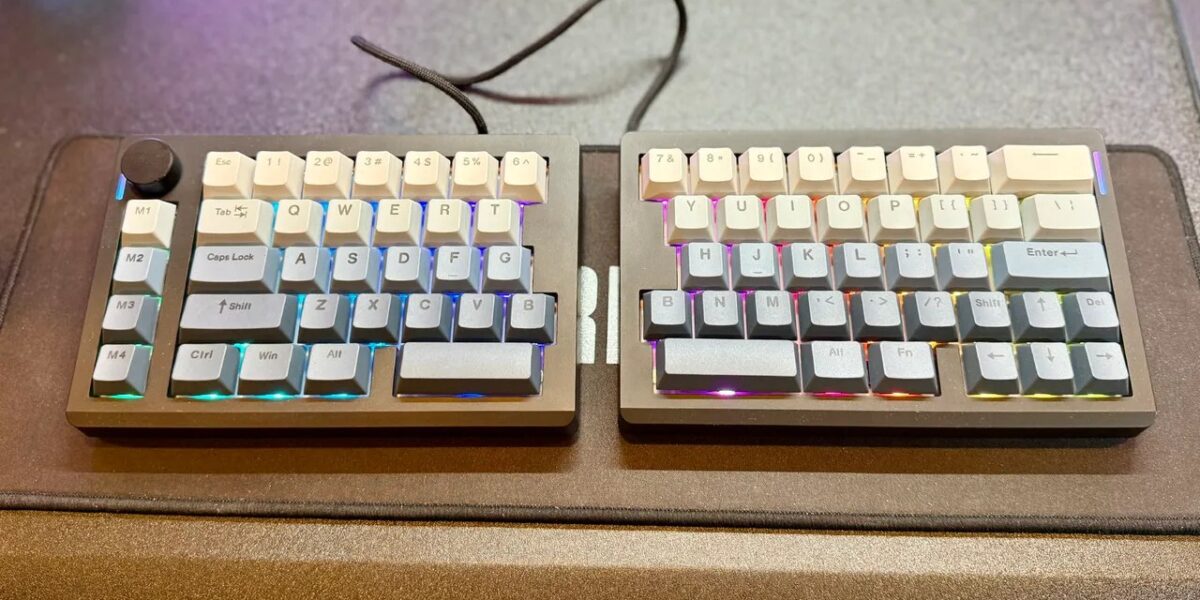
Epomaker Split 70 Keyboard Review: Ergonomic Innovation with a Learning Curve
The Epomaker Split 70 keyboard is an ambitious take on ergonomic design, aiming to provide a more natural typing experience. But does this split keyboard live up to the hype, or is it just another niche product for hardcore enthusiasts? Let’s dive in.
A Bold Approach to Ergonomics
Unless you’re deeply familiar with mechanical keyboards, you might not realize that a “70%” layout strips away the number pad and function row. This compact design saves desk space and brings your mouse hand closer to your typing center. However, it requires learning layered shortcut combinations to access those missing keys.
The Epomaker Split 70 takes this concept even further by physically splitting the keyboard in half, connecting the two sides with a USB-C cable. This allows you to approximate a row-staggered Alice layout, but with a more traditional orientation. It’s an innovative approach, but be prepared for a steep learning curve.
Design and Customization
The Epomaker Split 70 comes in Black/Grey and White/Blue colorways, featuring gradient PBT Cherry-profile keycaps. The box includes the two keyboard halves, a USB-A to USB-C cable (device to keyboard), a USB-C to USB-C cable (connecting the halves), a keycap/switch puller, three replacement Macintosh keys, and extra Wisteria Linear Switch V2 switches.
The matte black plastic finish looks great but seems prone to light scratches. A built-in volume knob is on the left side, while a hidden storage port for the 2.4GHz wireless dongle is cleverly located on the back.
However, the split and compact design forces some compromises. The Tilde (~) key is awkwardly placed next to Backspace, there are two “B” keys, and the Escape key has been moved from its usual location. Most notably, the right Shift key is tiny, compressed to a standard 1U size, and positioned awkwardly to the left of the Up arrow. This took considerable time to adjust to. I also miss the Function and Home keys.
Performance and Software
Despite the layout quirks, typing on the Epomaker Split 70 feels good. It comes equipped with pre-lubricated Wisteria Linear V2 switches (45g actuation force), but the hot-swappable PCB allows you to easily install your preferred 3-pin or 5-pin switches.
The gasket-mounted structure and five-layer sound-dampening system (latex, PET pad, silicone base) minimize hollow sounds and produce a smooth “thock.” The tri-mode connectivity (Bluetooth 5.0, 2.4GHz, wired) is powered by a 3,000mAh battery, providing over 10 hours with RGB on and hundreds of hours with it off. It automatically goes to sleep to conserve power.
The vibrant south-facing RGB backlighting can get very bright. For gaming, the 1000Hz polling rate (wired/2.4GHz) provides low latency (3ms-5ms), but key placement might still be awkward during intense firefights until you’re fully adjusted.
A unique gaming bonus is that you can disconnect the right half and use the left side as a dedicated WASD macro pad, freeing up desk space on the right side for mouse movements.
The keyboard is compatible with the open-source VIA configuration application, allowing you to remap keys, assign macros, and adjust RGB settings to alleviate some layout frustrations.
Purchasing Guide
The Epomaker Split 70 is available from Amazon and Epomaker with an MSRP of $115.99.
Follow IGN Deals on X for more deals.
In This Article:
Epomaker Split 70 Keyboard Review by Bill Loguidice






Comments
Be the first to comment.