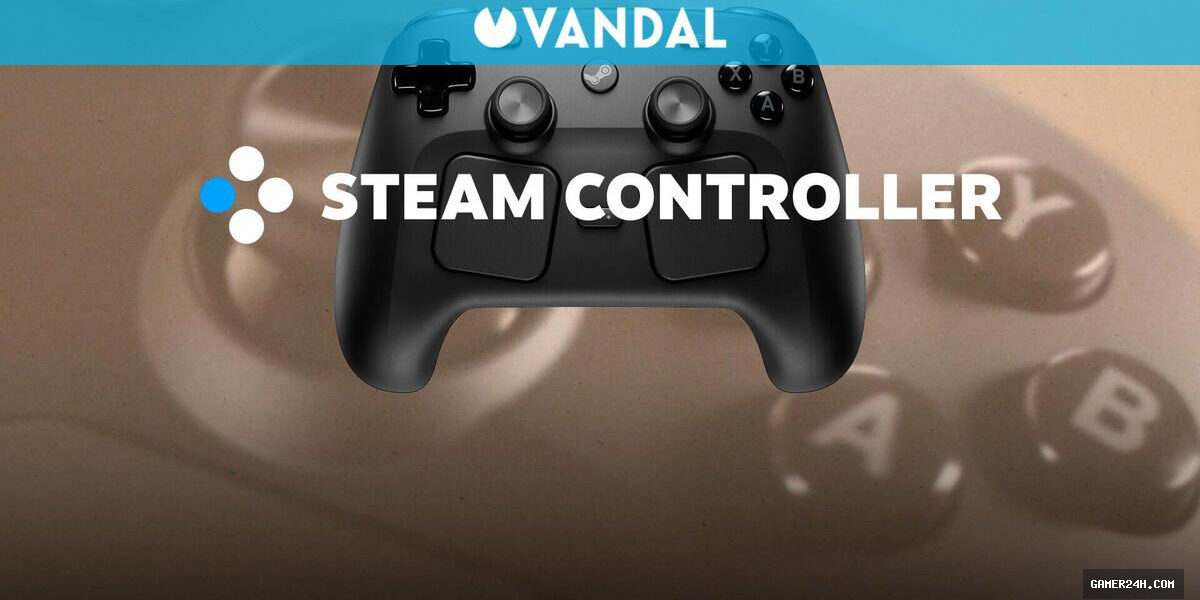
After sharing our impressions on the build quality and finishes, we turn to the possibilities offered by Valve’s new controller, beginning with an ergonomics that feels surprisingly comfortable despite its unconventional look.
The weight distribution is well balanced, and the grips and rear panel allow a firm, fatigue‑free hold even during extended gaming sessions. We’ll dive deeper below into specific features such as the placement of the rear buttons and the joysticks, which we believe are excellently positioned.
Valve’s TMR magnetic technology aims to eliminate the notorious drift that has plagued many PlayStation, Xbox, and Nintendo Switch controllers. By employing a symmetrical layout, the design ensures both sticks sit at the same height, creating a natural and comfortable thumb placement that feels intuitive.
The concave shape of the sticks is the most common design, and their symmetrical arrangement means both are positioned at identical heights. Given the controller’s shape, this configuration appears to be the most suitable, allowing thumbs to rest naturally and comfortably. Additionally, these sticks support capacitive touch, enabling the controller’s gyroscope to detect finger presence and respond accordingly.
From a usability standpoint, the new Steam Controller feels remarkably responsive, accurately mirroring every nuance of our movements while also offering the flexibility to tweak sensitivity and dead zones directly within Steam.
The latest iteration of the Steam Controller builds on its predecessor by introducing two square trackpads that echo the design seen on the Steam Deck. Each 34.5 mm surface is pressure‑sensitive and equipped with independent Linear Resonant Actuator (LRA) haptics, delivering pinpoint precision that makes it an almost natural mouse replacement for strategy titles, Windows navigation (when Steam is active), and even first‑person shooters where it outperforms traditional analog sticks in aiming accuracy.
Additional highlights include four rear buttons (L4, L5, R4, R5) and ergonomically designed grips that serve more than just a firm hold. These features add functional depth, as detailed further below.
The rear buttons are thoughtfully positioned, and the capacitive sensors in the grips unlock a range of intriguing functions. We can program the four back buttons to perform any action, and they have proven incredibly useful. Their placement strikes a balance between accessibility for quick presses and preventing accidental activation during high‑pressure moments in gameplay.
Beyond the ergonomic grips, the Steam Controller houses hidden grip sensors that can be customized to trigger distinct actions depending on whether you hold one, both, or none of the grips. The most noticeable trick is the ability to pause the game automatically when the controller is released.
The real allure of the Steam Controller lies in the extensive flexibility offered by Steam Input and its virtual menus, which unlock a wealth of possibilities for nearly every component of Valve’s device.
From radial and touch‑based menus to macros and grip‑specific functions, the Steam Controller’s potential with Steam is virtually limitless. For instance, the trackpads can replace a mouse with remarkable precision, double as joysticks, directional pads, button arrays, or even a touch‑radial menu where shortcuts and macros are mapped for quick weapon switching, item selection, or microphone toggling. The creative uses for these trackpads are boundless, and we’ve found them absolutely delightful.
Turning to connectivity, the Steam Controller’s integration with other systems has sparked considerable discussion. Technically, the primary method of use involves the Steam Controller Puck—a wireless receiver that plugs into a PC’s USB port and establishes a 2.4 GHz network to deliver the lowest possible latency. This standard, commonly found in PC peripherals such as keyboards, mice, and headsets, has consistently proven its performance.
❓ Frequently Asked Questions (FAQ)
Where can I find more details about Valve's 2026 Steam Controller: A €99 PC Gaming Masterpiece?
Further details and updates can be followed through official game channels and the source link provided in the article.
News Source: Elespanol





Comments
Be the first to comment.