While many users are familiar with Windows’ more prominent features, the operating system harbors a trove of lesser-known utilities that remain under the radar. These tools—such as Problem Steps Recorder, Character Map, and Phone Dialer—often surface through serendipitous discovery, in-depth research, or niche online communities. Their obscurity stems from Microsoft’s strategic decision to prioritize mainstream functionalities, leaving these utilities tucked away from casual users. This curated approach ensures that only the most essential tools are highlighted, while others linger in the shadows, waiting to be unearthed by curious explorers.
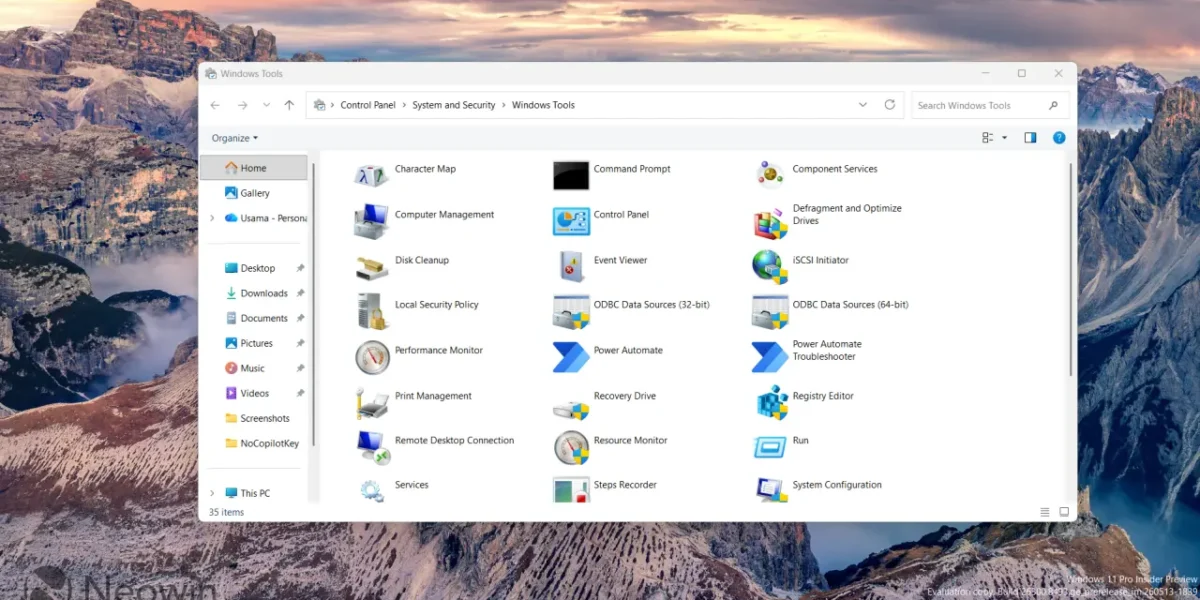
My recent encounter with the “hidden” Windows Tools interface—revealed through a Reddit thread on r/windows11—sparked a deeper dive into this overlooked corner of the OS. Contrary to its name, the interface isn’t concealed but rather underpromoted, accessible via a simple search for “Windows Tools” or navigating to Control Panel > System and Security > Windows Tools. What’s intriguing is its historical continuity: a Redditor shared a screenshot from Windows 2000 Professional, where the feature was originally labeled “Administrative Tools.” This continuity underscores Microsoft’s long-standing commitment to maintaining a centralized hub for system management, even as the OS evolves.
Upon exploring the current iteration of Windows Tools, I found a mix of familiar and enigmatic utilities. While staples like Task Manager and Disk Management are well-trodden ground, others—such as the iSCSI Initiator and Local Security Policy—remain shrouded in mystery. The iSCSI Initiator, for instance, is a specialized tool for network storage configurations, while Local Security Policy offers granular control over system security settings. These tools, though powerful, are rarely needed by average users, which explains their low visibility. Their presence, however, speaks to Windows’ versatility, catering to both casual users and advanced administrators alike.
The Windows Tools interface within theutility hub offers a subset of available applications that, while functional, does not claim to be exhaustive. A comprehensive search uncovers no official documentation delineating the exact requirements a program must meet for inclusion, leaving the selection process largely opaque.
The most striking aspect is the uncertainty surrounding the qualification criteria; although the list appears to prioritize first‑party software with administrative capabilities, the specific thresholds are not disclosed, and essential utilities such as the Group Policy Editor are absent despite satisfying the presumed conditions.
News Source: Neowin






Comments
Be the first to comment.