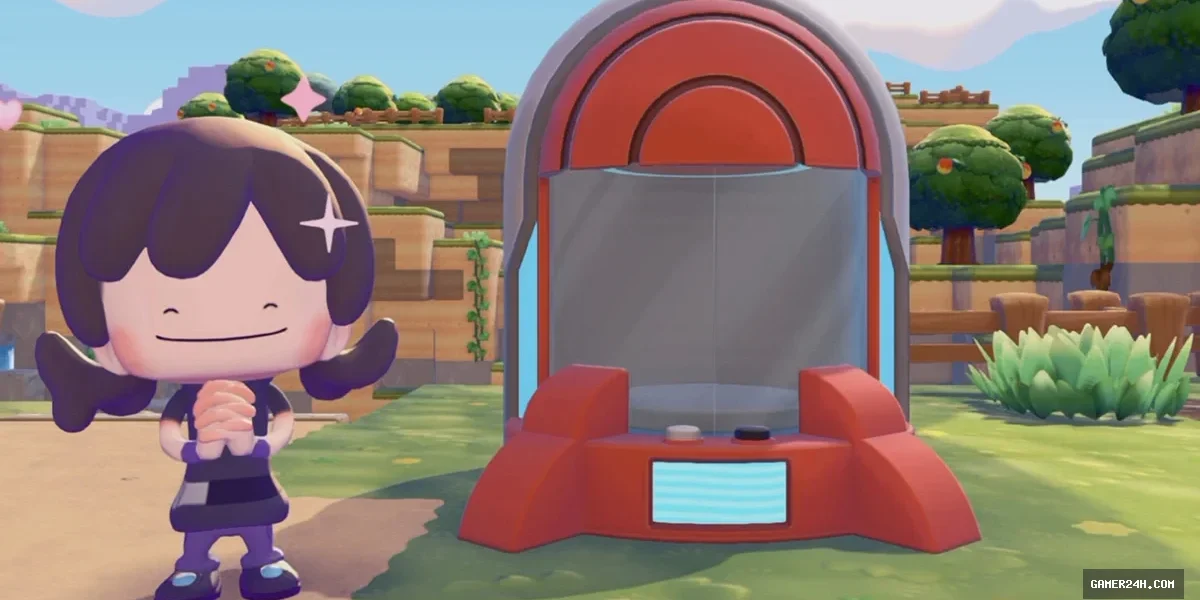
The latest 2.0.0 update to Pokémon Pokopia introduces the Portal Pod, a versatile shared storage solution that lets players consolidate up to 80 items in a single, universally accessible slot—no matter where the pod is placed.
For those navigating Ditto’s adventure, a comprehensive Pokopia walkthrough is available to streamline your progress.
To acquire a Portal Pod, first install the 2.0.0 patch. Then, advance Palette Town to Environment Level 8 to unlock the pod’s recipe, and spend 3,000 Life Coins to claim it.
Need Pokémetal? Hunt for its ore in the Sparkling Skylands or the Dragonite Doll Dream Island, then smelt it in a Furnace with a Burn Pokémon to obtain the material.
In the sprawling world of Pokopia, the newly introduced Portal Pod revolutionizes how players manage their inventory. Simply drop a pod into any region—be it the bustling Furnace district of Rocky Ridges or the serene shores of Bleak Beach—and fill it with items. Once placed, the pod becomes a hub that instantly grants access to its contents from every other pod scattered across the map, creating a seamless, cross‑regional storage network.
Players can even pick up a Portal Pod, move it to a new location, and drop it back onto the map without losing any of the items inside. This mobility turns the pod into a portable extension of your personal inventory, cutting down on the Pokémetal required to craft additional storage units.
Many gamers have already embraced this method, citing its efficiency and the freedom it offers to manage resources across diverse environments. If you’re eager to master Pokopia’s logistics, be sure to consult the Pokédex, Habitat Dex, and the guide on acquiring paint to fully harness the game’s creative possibilities.
❓ Frequently Asked Questions (FAQ)
How do I unlock and obtain a Portal Pod in Pokémon Pokopia?
First install the 2.0.0 patch. Then progress Palette Town to Environment Level 8 to unlock the recipe, and spend 3,000 Life Coins to claim the Portal Pod.
Can I move a Portal Pod after placing it, and will the items stay safe?
Yes, you can pick up a placed Portal Pod, move it to a new location, and drop it back onto the map without losing any of the items stored inside.
How does the Portal Pod affect inventory management across different regions?
A Portal Pod acts as a universal hub: once placed, its contents become instantly accessible from any other pod on the map, creating a seamless cross‑regional storage network that greatly simplifies item management.
News Source: Eurogamer






Comments
Be the first to comment.