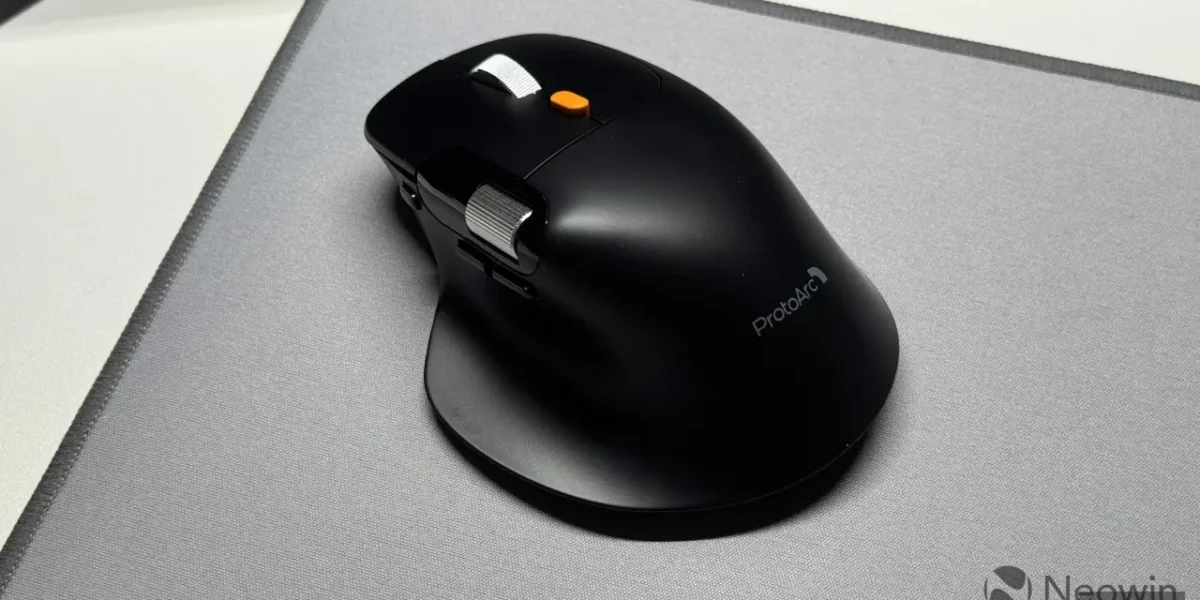
ProtoArc, a brand celebrated for its ergonomic office accessories, has once again pushed the envelope with its newest offering, the EM25. Designed to blend comfort with affordability, the mouse promises a customizable experience that feels as natural as it does functional.
Drawing clear inspiration from Logitech’s iconic MX Master series, the EM25 mirrors the silhouette and proportions of the MX Master 3/3S. Its generous palm‑support and strategically placed thumb rest give right‑handed users with larger hands a natural, strain‑reduced grip, while the subtle wrist tilt helps mitigate fatigue during extended sessions.
Constructed from matte black plastic, the EM25 offers durability without the need for protective coatings, though high‑contact areas may show wear over time. Weighing in at roughly 100 grams, it strikes a balance between heft and agility—lighter than the MX Master 3S and its successor, yet not as lightweight as typical gaming mice, ensuring a stable feel without excessive bulk.
The mouse features a clever magnetic flap that houses the USB dongle, opened with a simple press. Adjacent to the flap sits the power toggle, a 1,000 Hz sensor, and a DPI button that reaches up to 8,000 DPI. While the DPI button’s placement feels unconventional to some, it remains a functional addition for those who adjust sensitivity on the fly.
Unlike the MX Master 3, 3S, and 4, the EM25 places its device‑switching button directly beneath the left‑click. This subtle placement lets you toggle between paired devices without lifting or flipping the mouse, making it an ideal choice for users juggling multiple peripherals. The button is thumb‑friendly, unobtrusive, and requires minimal effort to activate.
The primary scroll wheel offers a choice between a click‑ratcheting and a smooth free‑flow mode. Switching between them is done via a bright orange, spring‑loaded button that demands a deliberate press. In free‑flow, the wheel operates silently, whereas the ratcheted setting produces a pronounced click and a firm resistance that some users might find a bit harsh. While not a deal‑breaker, it may take a short adjustment period.
A quiet, notched side‑scroll wheel adds a subtle yet satisfying tactile experience. Adjacent to it sits a glossy plastic panel displaying connection status—Dongle, Bluetooth 1, Bluetooth 2—and a low‑battery warning. The EM25’s internal battery charges through the supplied USB‑Type‑C cable, which comes with a protective sleeve and an orange Velcro strap to keep the cable neat.
Over several weeks of use, the EM25’s primary buttons have emerged as my top choice. Their tactile feedback strikes a pleasant middle ground between standard clicks and silent clicks, offering a satisfying click with just the right amount of force—neither too sharp nor overly loud. The back, forward, and device‑switch buttons are also highly clicky, though they produce a noticeable noise. A drawback is the absence of programmable side buttons, a feature that the MX Master series provides.
Beyond its impressive click performance, the EM25 stands out for its 1,000 Hz sensor. In a market where Logitech still ships 125 Hz units for $100‑plus mice, offering a far faster sensor at a fraction of the cost is a breath of fresh air.
All configuration is stored directly on the device, eliminating the need for proprietary software. A simple web interface lets you tweak settings on the fly.
You can remap every button, adjust DPI, and fine‑tune sensor speed. While gesture support is absent, the mouse still accommodates a wide range of shortcuts, media controls, and more. For extra flexibility, tools such as XMouseControl can reassign the side‑scroll wheel.
In short, the ProtoArc EM25 delivers the best of the MX Master family at a far more accessible price, featuring a superior sensor, on‑device memory, built‑in dongle storage, and remedies to the shortcomings I noted in the MX Master 4. Priced at $37.99 during Prime Day, it’s a compelling choice.
❓ Frequently Asked Questions (FAQ)
Why is the ProtoArc EM25 considered an affordable option compared to premium ergonomic mice?
ProtoArc has priced the EM25 competitively, especially during Prime Day, making it a budget-friendly alternative to high-end models like the Logitech MX Master 3/3S. The company focuses on essential ergonomic features—palm support, thumb rest, and a wrist‑tilt design—while using durable matte black plastic instead of costly coatings, keeping production costs low without compromising comfort.
In what ways does the EM25’s design mirror Logitech’s MX Master series?
The EM25 adopts the MX Master silhouette and proportions, featuring a generous palm‑support area, a strategically placed thumb rest for larger hands, and a subtle wrist tilt to reduce fatigue. Its overall shape and ergonomics are intentionally similar, giving users a familiar feel while offering a lighter weight of about 100 grams, slightly less than the MX Master 3S.
What features make the EM25 suitable for both gamers and professionals?
Key features include a 1,000 Hz sensor for precise tracking, an 8,000 DPI button for quick sensitivity changes, a magnetic flap that securely houses the USB dongle, and a power toggle for easy on/off control. Its balanced weight and ergonomic design provide stability for extended use, while the affordable price point appeals to budget-conscious gamers and office professionals alike.
News Source: Neowin






Comments
Be the first to comment.