

Security concerns remain a priority, as many sites still host malicious installers. Only the official outlets Guru3D.com and MSI.com are authorized to distribute MSI Afterburner, Rivatuner statistics server, Rivatuner CORE, and all RTSS‑related files.
Zooming has been streamlined directly within the editor workspace, allowing users to scale from 100 % to 500 % with the mouse wheel. Nodes now adjust fluidly with the zoom level, while right‑click dragging pans the canvas. A dedicated hotkey instantly restores the default view, resetting both zoom and pan—an essential tool after spending time zoomed in on a tight voltage window.
The second wave of improvements refines curve manipulation when selections are involved. Linear interpolation (Ctrl + drag) now respects selected ranges, using the farthest node in the selection as the anchor. An optional arbitrary linear interpolation mode lets you pick a source node, activate interpolation, and click a destination node to generate a smooth frequency offset curve between the two points. Additionally, the “move curve while preserving per-point offsets” function (Alt + drag) now operates on selections, dramatically cutting down repetitive adjustments when reshaping larger curve segments.

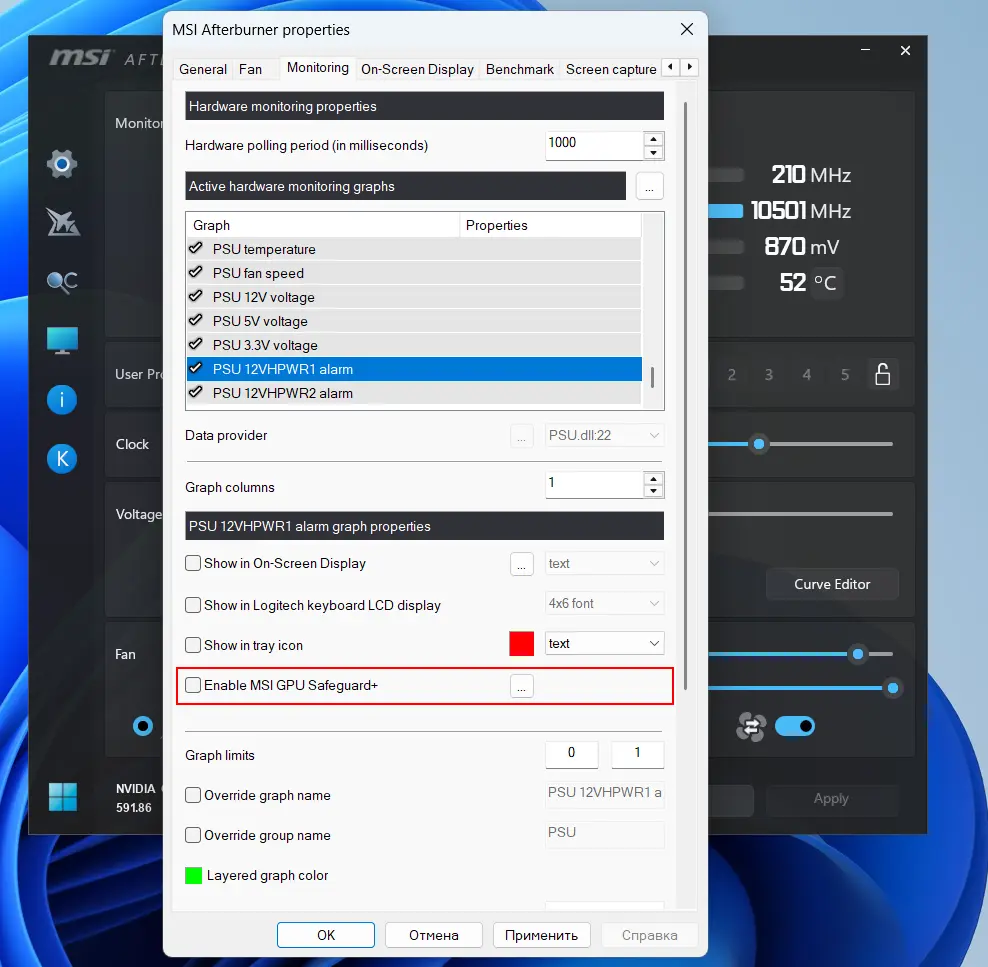
MSI’s latest firmware update brings a host of enhancements to its plugin ecosystem, notably a refined monitoring framework that lets third‑party extensions supply human‑readable labels for enumeration values—think “Safe” or “Alarm” instead of cryptic numeric codes in on‑screen displays. The update also introduces a streamlined, purpose‑built checkbox interface, enabling users to activate pre‑configured alarm behaviors with a single click.
At the heart of the release is a brand‑new PSU.dll plugin that unlocks native monitoring for MSI’s flagship MEG Ai1x00 and MPG Ai1x00TS power supplies. The plugin delivers comprehensive rail telemetry, real‑time output power, efficiency metrics, thermal readings, and fan speed data, giving enthusiasts unprecedented visibility into their system’s power delivery.
For users of supported MPG models, the plugin extends its reach to per‑pin current monitoring on 12VHPWR and 12V‑2×6 connectors. It also aggregates alarm sensors that detect overcurrent or imbalance conditions, which can be seamlessly linked to Afterburner’s alarm actions for instant notifications or automated mitigation.
MSI Afterburner, the celebrated graphics card utility from the Guru3D RivaTuner team, continues to evolve. While beta releases may carry expiration limits, the stable, final builds remain evergreen. We recommend always opting for the latest official build to avoid potential security or stability risks.
Our GeForce overclocking guide has been updated to reflect recent changes, including curve‑based tweaking and automated optimization techniques. Additionally, RTSS—the statistics server that powers Afterburner’s overlay—now supports DirectX 12, ensuring a smoother, more responsive experience for modern titles.
For a complete rundown of all changes, please consult the full release notes. If you encounter overlay issues post‑update, a clean reinstall of both RTSS and Afterburner (including profile removal) often resolves the problem. Remember, only downloads from Guru3D.com are guaranteed to be safe and tamper‑free; sourcing MSI Afterburner from third‑party sites can expose you to vulnerable or unstable versions.
News Source: Guru3d
Have thoughts, questions, or benchmarks on this topic? Join the discussion on our forums.
Join Discussion ➔






















Nice! Always stoked for Afterburner updates, especially with those new curve manipulation features. Sticking to Guru3D for the download, safety first!
I agree, though I’m keeping my expectations in check. The news for Download MSI Afterburner 4.6.7 is promising, but teh actual launch is what matters. Need a bit more inf. pretty promsiing sugoi!
shukran for the update! Finally, some proper updates to Afterburner. The curve manipulation and zoom improvements are key for precise competitive tweaking, but I’m still wary about security with all the fake sites out there, sticking to Guru3D
good to see 4.6.7 out, especially with the offiical download emphasis. The new interpolation modes and zoom refinements for voltage curves are solid QoL updates, crucial for precise OC.
cool, a new Afterburner update. Good to know only Guru3D and MSI.com are safe for downloads, gotta watch out for thosse malicious installers. The new zoom and curve tools sound handy for tweaking.
Good to see the new Afterubrner 4.6.7 release, especially with the streamlined ediotr zoom and improved cuve manipulation for voltage/frequency tuning. Sticking to Guru3D.com for teh download, as always.
great news if the update actually fixes the core issues. For Download MSI Afterburner 4.6.7, performance improvements are what matter most. Keeping expectations low. on my watchlist
good to see the official download warning, so many fake installers out there. The new curve manipulation and zoom features sound clutch for fine-tuning OCs.
Yeah, the official download warning is crucial, definitely saved me frrom sketchy sites before. And those new curve and zoom features will make dialing in OCs way less of a headache for sure. gomawo!
i’m a bit skeptical. What sounds good in the announcement for Download MSI Afterburner 4.6.7 rarely holds up in the actual game. Don’t believe the makreting hype. keeping an eye on this
Balance is everything in Download MSI Afterburner 4.6.7. Looks good on paper, but it’s all about how it actually feels in-game. FPS stability is what matters. pretty promising ganbatte!
Hmm, Afterburner 4.6.7 sounds like it has some neat quality-of-life updates, especially with teh streamlined zooming and curve manipulation. Good to know abuot olny downloading from Guru3D or MSI for safety too
Good to see the official sources reiterated for Afterburner 4.6.7, especially with the malicious installer issues. The enhanced curve manipulasion and zoom features sound like soid QoL for fine-tuning.