

If you want to hear enemy footsteps and other important audio cues clearly in Call of Duty: Modern Warfare 4, tweaking your audio settings can give you a noticeable advantage. A good starting point is to use headphones and set the effects volume to maximum.

Below are the best audio settings to use in MW4 to pick up footsteps more clearly and tell which direction an enemy is approaching from.
Quick Summary
- Set Effects Volume to 100 and Gameplay Music/Cinematic Music to 0.
- Keep Mono Audio off for better directional sound.
- Turn on Reduce Tinnitus Sound to minimize the impact of flash and concussion.
Table of contents
- Best audio settings to use in MW4
- Best voice chat settings in MW4
- MW4 best audio settings FAQ
Best audio settings to use in MW4
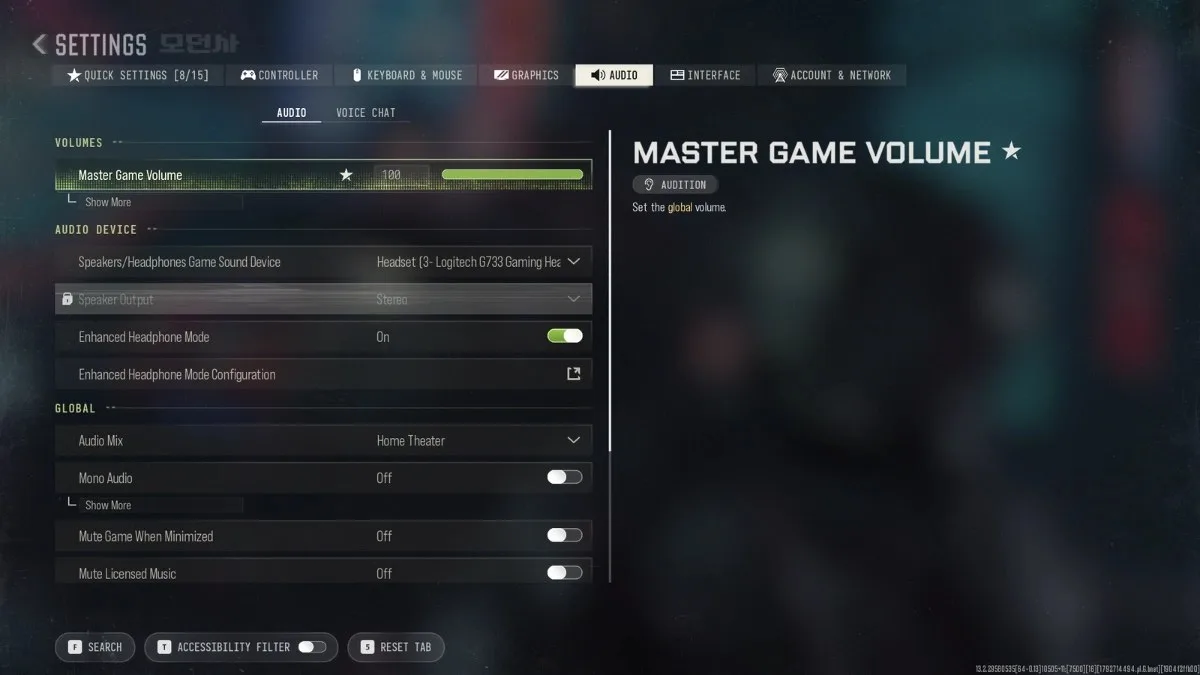
Loud and clear. Screenshot by Dot Esports
Volumes
- Master Game Volume: 80 to 100
- Gameplay Music Volume: 0
- Dialogue Volume: 70
- Effects Volume: 100
- Cinematic Music Volume: 0
Audio Device
- Speakers/Headphones Game Sound Device: Choose your device
- Speaker Output: Stereo
- Enhanced Headphone Mode: Personal preference
Global
- Audio Mix: Home Theater
- Mono Audio: Off
- Mute Game When Minimized: Personal preference
- Mute Licensed Music: Personal preference (mute if you’re streaming to avoid copyright strikes)
- Asymmetrical Hearing Compensation: Personal preference
Functionality
- Reduce Tinnitus Sound: On
- Headshot & Kill Alerts: On
The most important setting here is the Effects Volume. Keep it at 100 so footsteps and other important gameplay sounds aren’t unnecessarily reduced. Meanwhile, setting Gameplay Music and Cinematic Music to zero removes background music that can distract you from important audio cues.
Get rid of unnecessary sound. Image via Activision
Dialogue can remain at 70, although you can lower it further if you find operator callouts distracting. Master Game Volume ultimately comes down to your headphones and personal preference, but 80 and up should give you enough room to hear quieter sounds.
Like in other first-person shooters, headphones are recommended if you want to hear footsteps clearly and determine where an enemy is coming from in Modern Warfare 4. Home Theater is a great starting point for the Audio Mix, while Mono Audio should remain off for proper directional sound.
Turn on Reduce Tinnitus Sound to minimize the disruptive noise caused by concussion and flash grenades.
Best voice chat settings in MW4
Voice chat is largely a matter of personal preference. If you’re playing with friends, a third-party app such as Discord can be useful. If you prefer MW4‘s built-in voice chat, however, here’s our recommended settings:
Talk to your squad. Screenshot by Dot Esports
- Voice Chat Volume: 70
- Voice Chat Volume Boost: Personal preference (2x boost or higher if needed)
- Voice Chat: On
- Proximity Chat: Personal preference
- Game Chat Voice: Personal preference
- Voice Chat Output Device: Choose your device
- Directional Team Chat: Personal preference
- Microphone Level: 80
- Microphone Level Boost: Personal preference (same with voice chat volume, 2x boost or higher if needed)
- Test Microphone: Turn on and test your mic after adjusting your settings
- Microphone Mode: Personal preference
- Microphone Input Device: Choose your device
Set your Voice Chat Volume to 70 so teammates remain audible without completely overpowering gameplay sounds. If voices are too quiet, you can increase Voice Chat Volume Boost to 2x or higher.
Have your Microphone Level to 80 as a starting point, then use the Test Microphone option to make sure your voice is coming through clearly. You can increase Microphone Level Boost to 2x or higher if your teammates have trouble hearing you.
If you’re looking to fine-tune your gameplay further, check our guides for the best PC graphics settings, best mouse and keyboard settings, and best controller settings in Modern Warfare 4.
MW4 best audio settings FAQ
What is the best audio mix for hearing footsteps in Modern Warfare 4?
Home Theater is a good starting point for hearing footsteps and other gameplay sounds clearly.
Should I enable Loudness Equalization on PC or Audio Focus on PS5?
Yes. Enabling Loudness Equalization or Audio Focus can help make quieter sounds, such as footsteps, more noticeable by reducing the difference between loud and quiet audio.
Have thoughts, questions, or benchmarks on this topic? Join the discussion on our forums.
Join Discussion ➔






















Praat mee