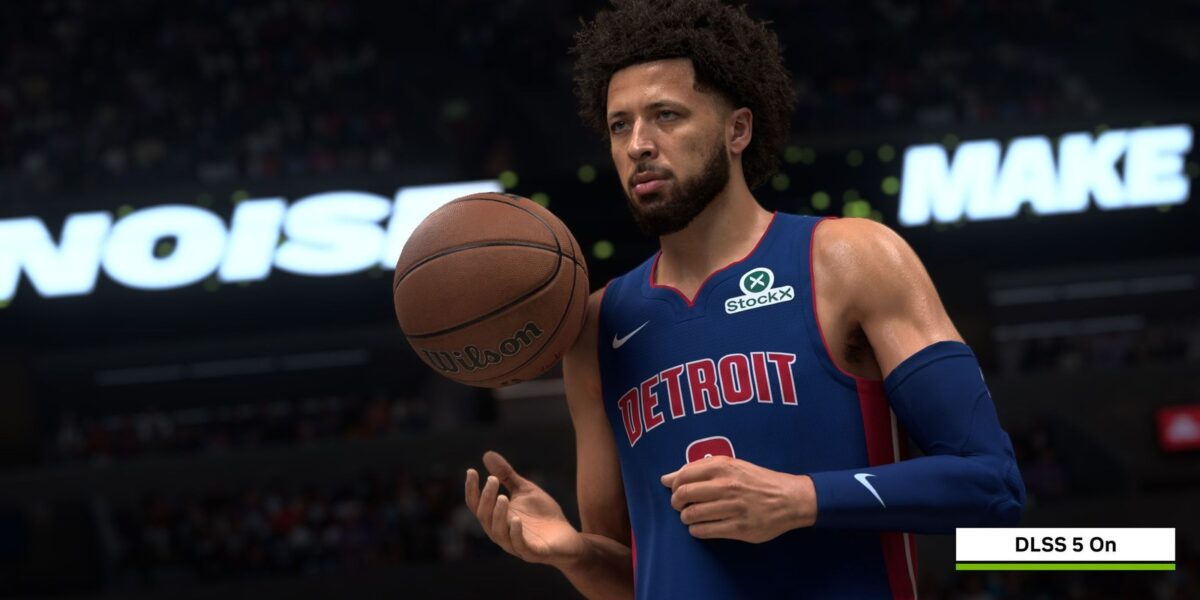
DLSS 5 is arguably Nvidia’s most controversial creation… ever. After the initial backlash, Nvidia’s AI-powered image enhancement technology has largely been kept under wraps. However, a select group of journalists, myself included, were recently given an exclusive look at DLSS 5 in action during Gamescom.
A Controlled Chaos
The demo took place in a small room at the Nvidia booth, and as the lights dimmed, it became clear why we were there: to witness the latest version of DLSS 5. The message from Nvidia was clear: developer control is paramount. I watched as a character sat within the Nvidia Zorah demo, earlier this year. As he sat, looking around at his environment in a bored fashion, I leaned forward in my chair. DLSS 5 was obviously altering the image to a significant degree, but seeing the results in person, it was clear this was nowhere near the “uncanny valley” level of AI enhancement shown in the first reveal.
The character, casually inspecting the back of his hand, looked remarkably like the original model—but with more photorealistic lighting and finer details that enhanced the scene. It wasn’s as jarring an image as I had anticipated.
A key feature was the developer control menu, with two sliders marked for adjustment. At these settings, the character looked pretty damn good.
Developers have access to additional tools, including a masking feature that allows them to selectively enhance specific elements in a scene (like a fruit bowl on a table) while leaving everything else untouched. They can also switch between different AI models on the fly.
Nvidia emphasizes that these fine-tuning abilities are designed to be developer-friendly, allowing them to seamlessly integrate DLSS 5 into their workflows on a model-by-model basis.
However, as I experimented with the sliders and presets, a crucial truth emerged: while a subtle touch of DLSS 5 can significantly improve image quality, pushing it to its limits can still produce undesirable results.
Three AI models (A, B, and C) are available in the demo. While models A and C looked good at various settings, model B caused me to wince when pushed to their extremes. The HDR-like shadows became overblown, skin textures too shiny, and facial features overly defined.
In some cases, characters with model B could look substantially different from the original model, reminiscent of AI beauty filters.
While I initially argued that even perceived changes in facial geometry were functionally equivalent, my hosts countered that it was simply a matter of lighting effects. This sparked a philosophical debate that ultimately ended in a stalemate.
The longer I experimented, the clearer it became that DLSS 5 can create stunning imagery with a delicate touch, but also produce overblown results when pushed too far. It’s capable of enhancing—but also altering an image with the subtlety of a sledgehammer.
The example above shows a DLSS 5-enhanced scene of some foliage against a building, with ray tracing turned on and off. It’s supposed to demonstrate that the more lighting information you give the models to work with, the better the visual result. The DLSS 5 and ray-traced image combined, though, looks seriously oversaturated to my eyes. Realism has gone out of the window, and the end result is… lurid, to say the least.
Ultimately, it’s up to developers to decide how far to push the technology. I was then taken into a separate room to try out NBA 2K27, the first game you’ll be able to play with DLSS 5 enabled.
The developers were tight-lipped about the specific implementation, but I estimate that everything I saw was achieved using a more conservative approach.
I didn’t experience any of the AI-related issues I had previously encountered. The sweat running down the players’ arms looked more realistic, facial features were better defined, and the crowd in the background transformed from low-poly models into a more passable depiction of basketball match attendees.
To my surprise, it felt like playing a next-gen game with cutting-edge graphics technology, rather than an ill-advised AI gaming revolution.
I was careful to look for signs of ghosting or morphing AI faces under fast motion, but there were no issues. I played virtual basketball, I sucked at it, and I enjoyed the look of the game overall.
However, there’s a significant performance cost associated with using DLSS 5. Nvidia estimates a 50-60% performance hit, which is a major consideration for gamers.
While further performance improvements are planned, this remains a significant hurdle to widespread adoption. The ethical implications of AI-enhanced gaming also remain a contentious issue.
While I can appreciate the potential benefits of DLSS 5, I’m still grappling with the broader implications of AI-enhanced gaming. The demos I saw should have excited me, but they also left me feeling conflicted.
Is this where the games industry is heading? Will I be spending most of my gaming time looking at more AI-enhanced imagery? Will developers embrace the technology wisely, or will major releases eventually go for the full “yassified” approach?
Ultimately, it’s up to each gamer to decide whether or not they want to engage with DLSS 5. It launches on September 3rd, and we’re all going to have to make that decision for ourselves.





Comments
Be the first to comment.