Gamers, rejoice (or maybe groan)! If your favorite multiplayer games have suddenly decided to take an unscheduled exit after installing the latest Windows 11 update, you’re definitely not alone. Microsoft is aware of the issue and actively investigating, but in the meantime, one developer has a potential workaround for those experiencing crashes.
The Crash Report: What’s Happening?
Microsoft has identified several “symptoms” popping up across a limited number of games following the August 11th update. These include:
- Game applications becoming unresponsive.
- Unexpected game application closures.
- The dreaded “EXCEPTION_ACCESS_VIOLATION” error message.
- Unexplained device restarts.
While Microsoft has officially confirmed crashes in Arc Raiders, Marvel Tōkon: Fighting Souls, and The Finals, the issue appears to be more widespread. If you’ve encountered similar problems with other games since updating your Windows 11 installation, Microsoft encourages you to submit feedback through their official channels.
Is it the Update?
Microsoft is currently investigating whether the latest Windows update is indeed the culprit behind these crashes. Early reports suggest that versions 25H2 and 24H2 are most affected, while version 26H1 seems to be relatively stable. This information could help you determine if your system is at risk.
Arc Raiders Dev Steps Up with a Workaround
Embark Studios, the talented team behind Arc Raiders, has taken to Discord to share a potential solution. According to their post (via Embark’s Discord), the crashes are linked to changes made to the “inpoutx64.sys” file during the Windows update. While not ideal, this workaround involves using the Command Prompt to temporarily disable and delete this file. Important Note: This is an unofficial fix, and we haven’t personally tested it due to not experiencing any crashes ourselves. Proceed with caution and at your own risk.
Embark Studios Discord Post – Screenshot of the inpoutx64.sys workaround Beyond Crashes: Graphical Corruption Concerns
The issues don’t stop at just game crashes. Some users are reporting graphical corruption problems following the latest Windows update. One user on Reddit thread demonstrates these problems in both Valorant and Roblox, using both a dedicated graphics card and an integrated solution. Others report that uninstalling KB5120703 has resolved black screen issues. This suggests the problem might be more widespread than initially thought.
Rolling Back: A Potential Solution?
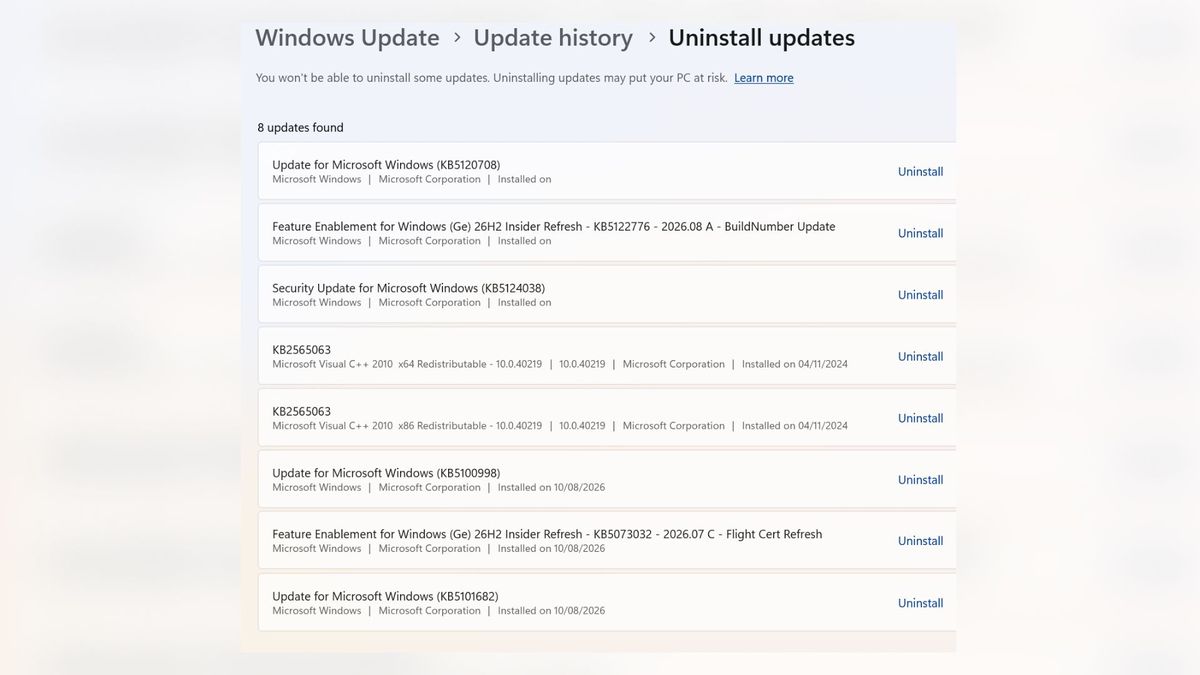
If you’re experiencing these problems and want to explore a more permanent fix, rolling back your Windows version is an option. Here’s how:
- Search for “Windows Update” in the Start menu.
- Click on “Update history.”
- Scroll down and click on “Uninstall updates.”
- Select and uninstall update “KB5120708”.
Keep an eye out for official announcements from Microsoft regarding a fix for these issues. In the meantime, stay informed, back up your data, and happy gaming (hopefully without any unexpected crashes)!



Comments
Be the first to comment.