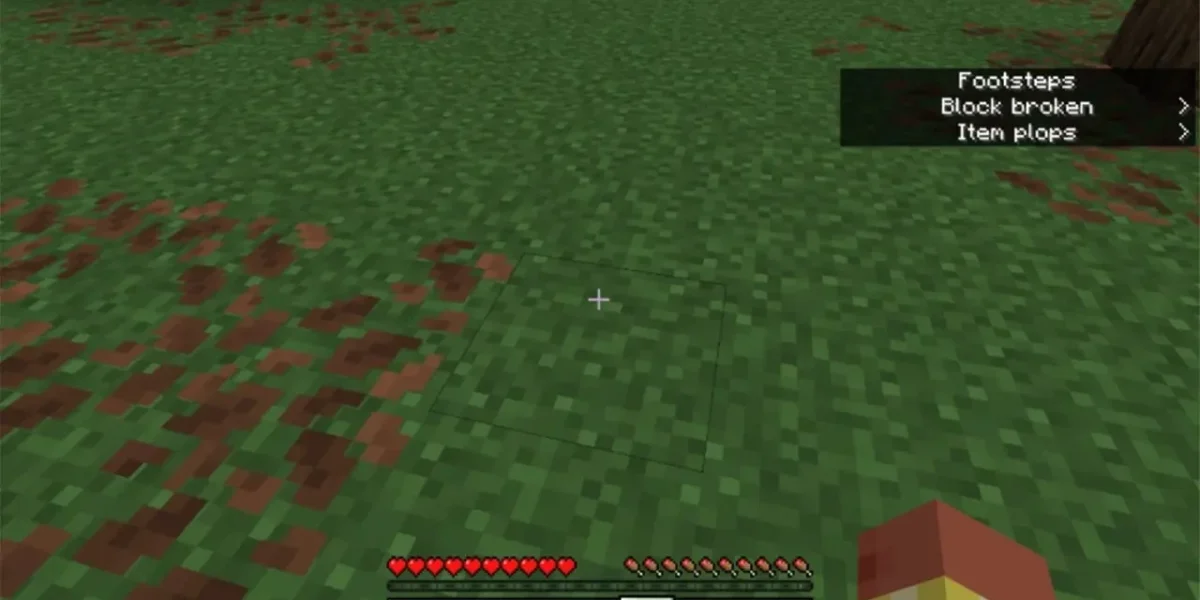
While the Bedrock and Java editions of Minecraft share many core mechanics, they diverge in several key areas. One of the most notable distinctions has been the availability of subtitles or closed captions—a feature that, for ten years, existed solely in the Java version.
With the latest update, Mojang has finally extended this accessibility to Bedrock players, delivering full closed‑caption support after months of preview testing.
Mojang highlighted the practical benefits of the feature: “Text and visual cues are an excellent way to share information that might otherwise be missed by many people, including deaf and hard‑of‑hearing players, players who process audio differently, or anyone dealing with plain old broken headphones. Now everyone can be more aware of their surroundings in Minecraft, dramatically lowering the chance of creeper sneak attacks.”
To activate closed captions, Bedrock users should navigate to Settings → Accessibility → Gameplay. From there, they can fine‑tune the display duration, screen placement, and even filter which sounds generate captions, such as silencing personal audio or weather effects.
Activating this new audio‑visual aid in Minecraft will display concise labels for nearby sounds—footsteps, enemy noises, door creaks, and more—while also providing directional indicators so players can pinpoint the source instantly.
However, the current build is not without hiccups. Players may encounter mislabelled or erratic sound tags, misleading directional arrows in vertical environments, and an overabundance of captions that clutter the HUD. Mojang has urged the community to report these glitches through its feedback portal so the feature can be fine‑tuned in forthcoming patches.
❓ Frequently Asked Questions (FAQ)
When did Minecraft Bedrock finally receive closed captions?
Mojang released full closed‑caption support for Bedrock in the latest update, marking the first time the feature became available on that edition after a decade of being exclusive to Java.
How can Bedrock players activate and customize closed captions?
Navigate to Settings → Accessibility → Gameplay. From there, enable closed captions and adjust options such as display duration, screen placement, and which sound types generate captions (e.g., silencing personal audio or weather effects).
What are the main benefits of adding closed captions to Bedrock?
Closed captions improve accessibility for deaf, hard‑of‑hearing, and audio‑impaired players, help those with unreliable audio hardware, and provide visual cues that reduce missed information—such as early warning of creeper sneak attacks—making the game more inclusive and safer for all players.
News Source: Neowin



Comments
Be the first to comment.