

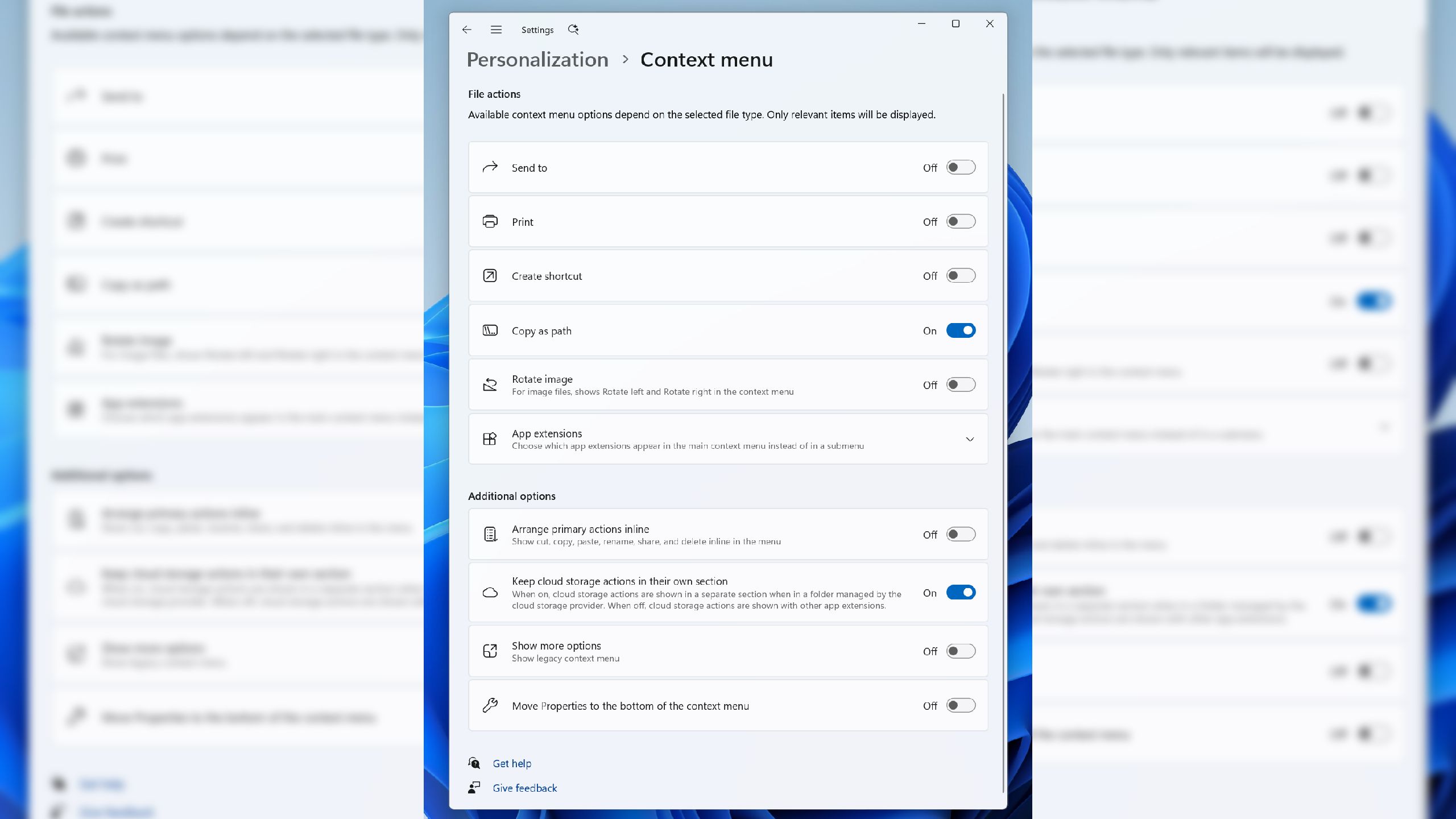
For many of us, the allure of new games and shiny GPU upgrades often overshadows the subtle but crucial improvements to our operating systems. But let’s be honest, a smoother, more responsive Windows experience can significantly enhance our daily gaming lives. And thankfully, Microsoft seems to have heard our cries for help! They’re rolling out some long-awaited changes to Windows 11 that address two of the most common complaints: the sluggish File Explorer and the dreaded new context menu.
File Explorer Gets a Performance Boost
Let’s start with File Explorer. Microsoft acknowledges the performance issues many users have experienced, including freezes, hangs, and delays. They claim to have identified and eliminated “dozens of potential stalls and interruptions” in the experience. This translates to faster browsing, renaming files, navigating folders, and selecting multiple files – all things we do constantly when managing our game libraries and mod collections.
Beyond raw speed, Microsoft is also tweaking those “small interactions that happen every day.” Expect more immediate filename changes, improved address bar functionality (including middle-click opening!), clearer file size displays, and generally a more responsive feel. While these might seem like minor tweaks, they collectively contribute to a significantly better user experience.

The Context Menu: Bringing Back the Familiar
Now for the big one: the context menu. The shift from the Windows 10 context menu to the new Windows 11 design was jarring for many users, including yours truly. That horizontal row of icons and the absence of “Properties” at the bottom felt like a step backward. Thankfully, Microsoft is finally giving us options to customize it.
You’ll now be able to list those core commands (Cut, Copy, Paste, Rename, Delete, and Share) inline within the menu instead of as a row of icons. And yes, you can finally move “Properties” back down to the bottom where it belongs! This is a huge win for anyone who prefers the classic Windows 10 context menu experience.
Furthermore, Microsoft recognizes that speed is key. They’re working to dramatically reduce the time it takes for the context menu to appear after you right-click. And with the addition of a “Customize menu” option at the bottom, you can now fine-tune the menu to perfectly match your preferences and workflow.
These changes are currently available in the Windows 11 Insider build, but Microsoft plans to roll them out to the general public soon. This is excellent news for all Windows 11 users who have been longing for a more refined and user-friendly experience. It’s clear that Microsoft is listening to its community and committed to making Windows 11 a truly enjoyable platform for gaming and beyond.
Source: PC Gamer























Join the conversation