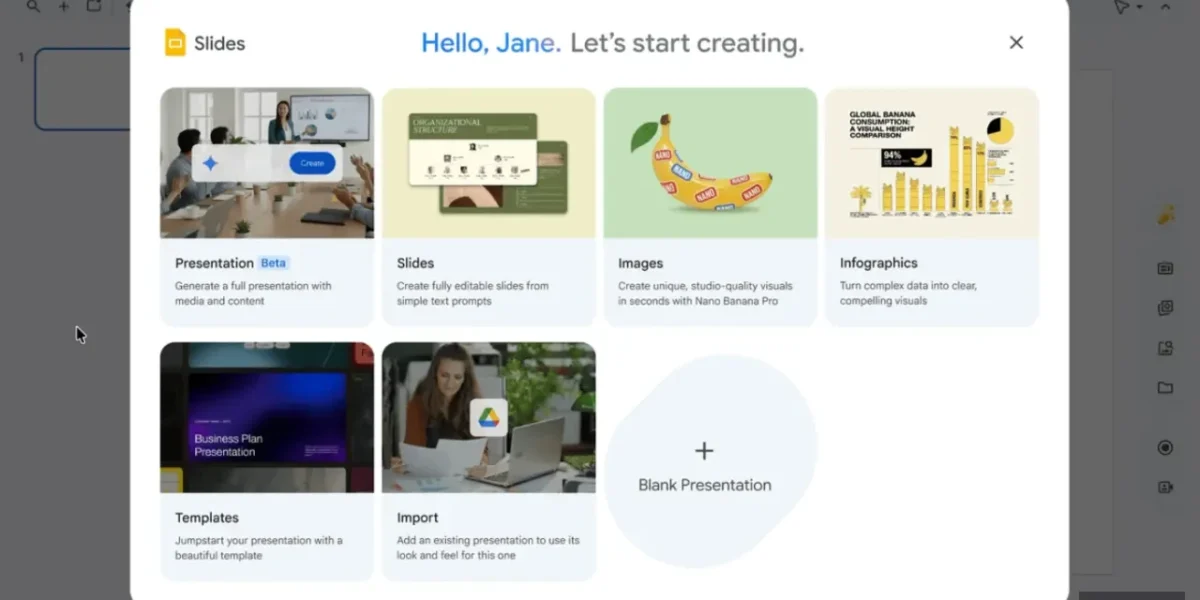
Google’s Gemini is stepping beyond the traditional “few‑slide” AI helper, now capable of crafting a complete Google Slides deck from a single prompt. Once the AI finishes, every slide remains fully editable, letting users fine‑tune text, tweak layouts, or make any other adjustments just as they would with a hand‑crafted presentation.
What makes this feature especially practical is that Gemini can draw on existing resources rather than starting from zero. Users can attach documents, spreadsheets, or other files from Google Drive to supply context, and even feed in a pre‑existing branded template to serve as a stylistic guide.
Before the deck is generated, Google has incorporated a planning phase. After submitting a prompt, Gemini may pose follow‑up questions about the target audience, desired tone, or specific content points. This pre‑generation outline review allows creators to tweak the structure early, minimizing the need for major revisions later.
Additionally, Gemini offers file‑suggestion capabilities, recommending relevant documents, emails, or chat snippets that could enrich the presentation. This feature aligns with Google’s Personal Intelligence initiative, which seeks to give Gemini access to a broad array of personal data points. Currently, the functionality is limited to English.
Google has announced that it will roll out a new feature without any administrative controls, beginning its phased deployment across both Rapid Release and Scheduled Release domains. The extended rollout is slated to commence on 29 June 2026, and the capability will be available to subscribers of Business Standard, Business Plus, Enterprise Standard, and Enterprise Plus plans, as well as to users of Google AI Pro, Google AI Ultra, the Google AI Pro for Education add‑on, and the AI Expanded Access add‑on.
In a move that signals a shift in its partnership strategy, Google is reportedly restricting Gemini’s availability to Meta, while simultaneously boosting usage limits for its own Workspace customers. For the time being, users crafting multi‑slide presentations with Gemini will benefit from higher quotas, a concession that will remain in effect until at least 1 August 2026, after which the standard per‑user limits will resume. Google has pledged to publish detailed guidance on the revised limits in its Help Center ahead of the transition.
❓ Frequently Asked Questions (FAQ)
How does Gemini create a full Google Slides deck from a single prompt?
Gemini uses advanced natural‑language processing to interpret your prompt and then generates a complete deck, pulling in relevant content from any attached documents, spreadsheets, or templates. It also asks follow‑up questions about audience, tone, and key points to refine the outline before the slides are produced.
Can I customize the AI‑generated slides after they are created?
Yes. Once Gemini finishes, every slide remains fully editable—just like a hand‑crafted presentation. You can tweak text, adjust layouts, change styles, or add new elements as needed.
What types of files can I attach to give context to Gemini?
You can attach documents, spreadsheets, PDFs, or any other files from Google Drive. Gemini can also use pre‑existing branded templates to guide the design and recommend related files, emails, or chat snippets to enrich the deck.
News Source: Neowin






Comments
Be the first to comment.