


About this game
Game Overview & History
Visit Archaeology at Levi D. Smith Games
Welcome to Archaeology!
Here are the details of playing the game.
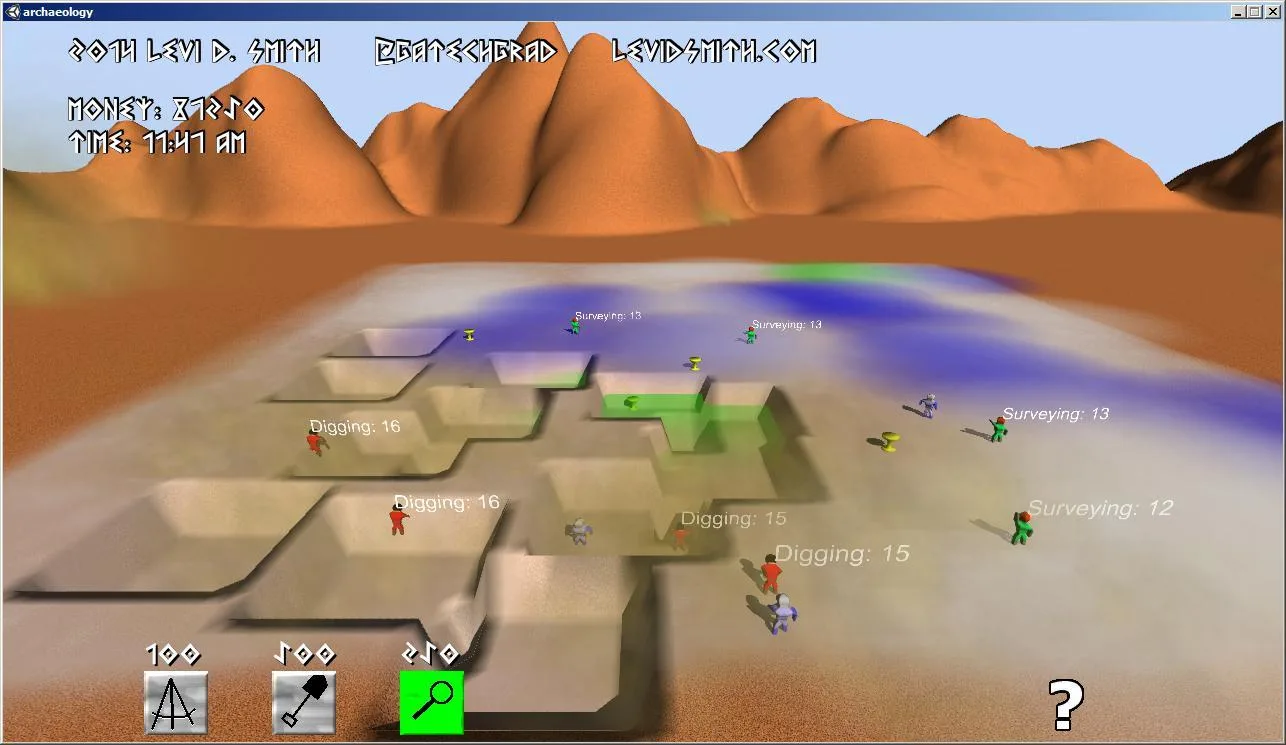
First select a surveyor to find good locations for treasure. If treasure is found nearby, the ground will be highlighted with a certain color:
White – no treasure near
Blue – little treasure
Green – moderate treasure
Yellow/Red – lots of treasure
Once you find a good location for treasure, assign an excavator to that area. If the excavator successfully digs up treasure, it will be shown in the world. Then assign an appraiser, who will determine the value of the treasure and add it to your total money.
Repeat until you’ve found all of the treasure, but you have only until 7pm before the game is over.
Resources
Surveyor (Tripod Icon) – Finds the best spots to dig
Excavator (Shovel Icon) – Digs for treasure
Appraiser (Magnifying Glass Icon) – Determines how much discovered treasure is worth
Controls
Left Mouse Click – Press buttons / Place objects
Right Mouse Drag – Move camera view
Mouse Wheel – Zoom In/Out
Subscribe on YouTube | Follow on Twitter | Like on Facebook
Release & Industry Impact
Time Lapse Development
Gallery


Join the conversation